Free one-line diagram maker for electrical contractors

The single-line diagram tool that does the drafting.

Single-line diagrams, free in your browser. Start drawing with no account. When the job needs a stamped fault current study or arc flash labels, our engineers take it from your drawing.

Free to useNo account to start drawingPDF and CSV exportPreliminary fault current
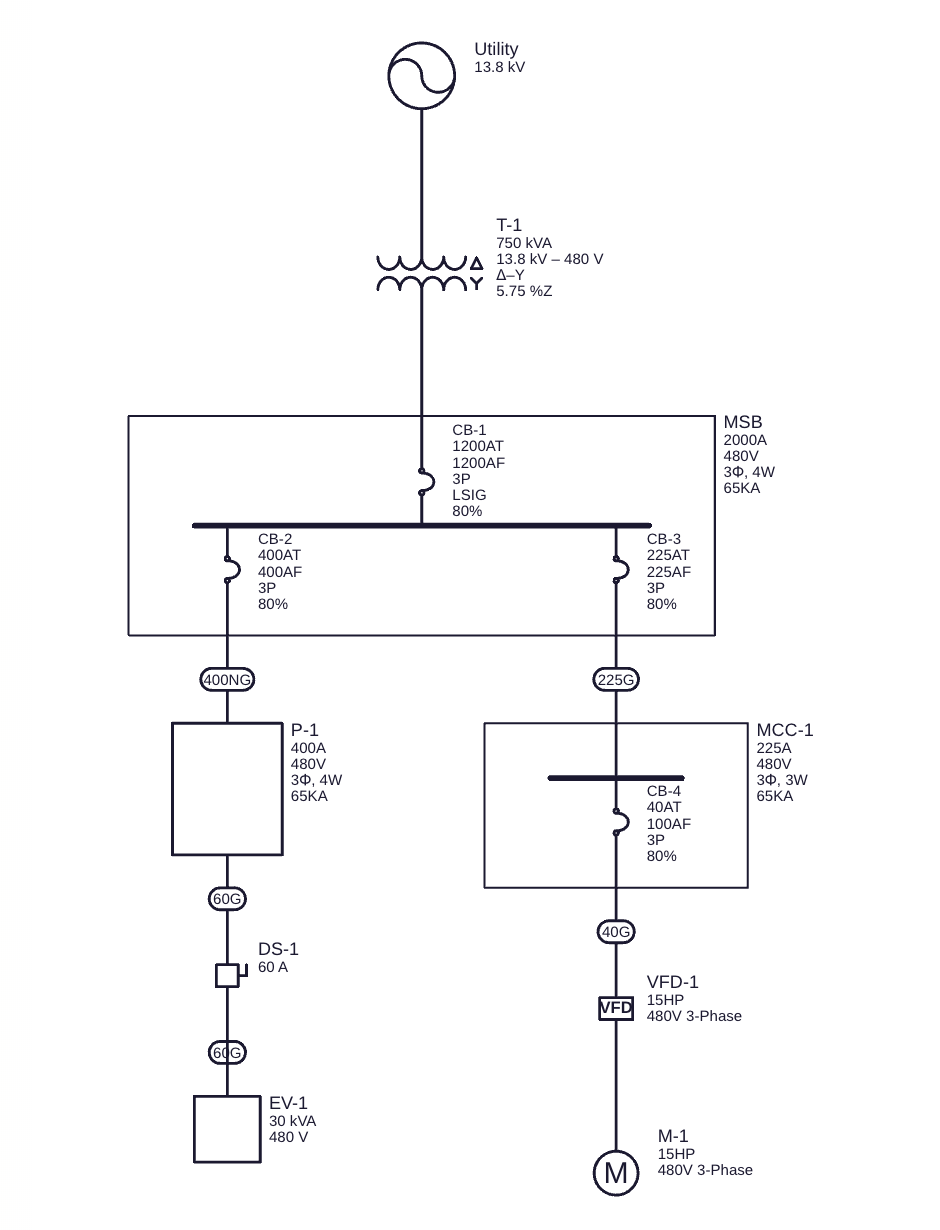
Single-line diagram of a 480 V service: utility, 750 kVA transformer, main switchboard with feeder breakers, a panelboard, an MCC with a VFD and motor, a disconnect and an EV charger

You place equipment. The app draws the single-line, tags it, builds the schedules and the PDF.

How it works

From a blank sheet to a one-line in four steps.

You add the equipment; the app does the drafting. The electrical model is the source of truth, so the drawing, the schedules and the PDF always agree.

  1. Open a blank sheet

    Go to the editor and start drawing. No account, no download, no template to buy. Your drawing stays in your browser until you sign up to save it.

  2. Add the equipment

    Drag a utility, transformer, switchboard, switchgear, panelboard or MCC onto the sheet. Select a bus and press “+” to add a breaker, feeder and the equipment it feeds in one step.

  3. Let the app draft it

    Ratings, voltages and conductor sizes are filled in with defaults you can overwrite. Feeders are sized from the breaker rating. Tidy Up lays out the sheet; every wire is horizontal or vertical.

  4. Export and share

    Download a vector PDF with a title block and your firm’s logo, and CSV schedules for the estimate. Sign up with an email to export a PDF or CSV, save projects and keep revisions.

Try it now Opens the editor in a new tab. Nothing to install.
What it does

Built for the one-line, not for drawing boxes.

Every object on the sheet is a piece of electrical equipment with ratings, terminals and feeders. Move it, rename it, re-sheet it: the connections stay put.

  • EQ

    A real equipment library

    Utility, transformers, switchboards, switchgear, panelboards, MCCs, motors, VFDs, generators, transfer switches, breakers, fuses, disconnects, feeders and busway. Each carries its ratings.

  • FDR

    Feeders sized as you draw

    Conductor, neutral, ground, raceway and raceway size follow the breaker rating from a built-in feeder schedule. Change the breaker and the feeder follows. Copper by default, or aluminum when you choose it. Sizes come from a standard pick-list.

  • TAG

    Tags that read like a drawing

    Breakers print name, trip, frame, poles, trip unit and rating. Gear prints bus rating, voltage, phase and wires. Feeder type codes sit in ovals with the schedule table placed on the sheet.

  • SLD

    Drafted, not drawn

    ANSI-style single-line symbols, orthogonal routing and automatic layout. Move things around freely; the electrical connections never change.

  • CHK

    Checks while you draw

    Voltage mismatches, unconnected terminals, missing ratings and code warnings, such as a conductor too small for its breaker or an undersized ground, show up in an Issues list next to the drawing, not after the print.

  • BOM

    Schedules and BOM

    An equipment schedule you can edit in a table view, the feeder schedule and an issues list, exported as CSV for the estimate.

  • PDF

    Sheets you can issue

    ANSI A to E and ARCH A to E1 sheet sizes, a title block with company, drawn by, date and revision, searchable text, and your logo on every sheet. No watermark; a small “Drawn with oneline.build” line in the margin can be turned off.

  • REV

    Saved, with history

    Autosave, undo and redo, and revisions you can restore. With a free account your projects are kept and shared with your workspace.

Preliminary fault current

A first look at fault current, labelled for what it is.

A first look computed from the values in your model, some of which are oneline.build defaults. Enter the utility’s available fault current and X/R ratio; feeder lengths, transformer impedance and motor data start from defaults you can overwrite. The editor computes a Preliminary Three-Phase Symmetrical Fault Current at each bus, with the contributions of utilities, generators and motors, and shows it beside the bus. It is free; an email sign-up is needed to run it.

What you get
  • Symmetrical three-phase fault current, in kA, at each bus, with the share from each source
  • The list of every input it used and which ones were defaults
  • Its limitations, shown with every result
  • A clear flag whenever the model changes and the result is out of date
What it is not
  • Not a short-circuit, arc flash or coordination study
  • Not an equipment rating, SCCR, breaker duty or pass/fail
  • Not reviewed, certified or sealed by anyone
  • Not for selecting equipment, setting devices or making labels
  • Not the available fault current documentation for marking service equipment

Not a short-circuit, arc flash or coordination study, and not a replacement for a complete engineering study by a licensed professional engineer. Values it cannot fill, such as the utility’s fault current, are asked for by name rather than guessed. For anything beyond a first look, request a study. Request a quote.

Free tool, engineer-led studies

The tool is free. Engineering is the service.

oneline.build makes the drawing part fast and free. When a project needs a real study, our engineers take it from the drawing you already built. Every study is quoted for its scope.

$0

Free, for everyone

  • Draw single-line diagrams in the browser
  • Export PDF sheets and CSV schedules (email sign-up)
  • Preliminary fault current (email sign-up)
  • Save projects, revisions and your logo
Try it now
Quoted

Fault current study, stamped and sealed

  • Prepared and sealed by a licensed professional engineer
  • Starts from the drawing you already built
  • Every study is quoted for its scope
  • Report delivered with the study
Request a quote
Quoted

Arc flash study and labels

  • Led by a licensed professional engineer
  • Starts from the drawing you already built
  • Every study is quoted for its scope
  • Equipment labels delivered with the study
Request a quote
Questions

Straight answers.

What the free tool does, where its values come from and where it stops.

01Is oneline.build really free?

Yes. Drawing, saving, PDF and CSV export and the preliminary fault current are free today. oneline.build also quotes stamped fault current studies and arc flash studies and labels for projects that need them. If we ever introduce charges, we will tell you first and you can export your drawings before they apply.

02Do I need an account?

Not to start. Open the editor and draw; your drawing is kept in your browser. An email sign-up is needed to export a PDF or CSV or run the preliminary fault current, and to save projects and add your logo. Your drawing comes with you.

03Which equipment can I draw?

Utility services, transformers, switchboards, switchgear, panelboards, motor control centers, motors, VFDs, generators, transfer switches, circuit breakers, fuses, disconnects and fused disconnects, cable feeders and busway. Switchboards, switchgear, panelboards and MCCs hold their own buses and breakers, so a feeder leaves a real breaker on a real bus.

04Where do the values I did not type come from?

They are starting defaults filled in for speed: voltages copied from upstream, breaker and bus ratings, conductor sizes from a feeder schedule keyed to the breaker rating, transformer impedance from a reference table. Anything you type replaces the default. Feeder lengths for the fault current start from defaults by what the feeder serves. Values with no sensible default, such as a generator’s reactance, stay blank until you enter them. The utility’s available fault current shows a placeholder on the drawing, and the fault current calculation will not run until you enter the utility’s value and X/R ratio.

05What does “preliminary” mean for the fault current?

It is a first look computed from the values in your model, some of which are oneline.build defaults. It is labelled preliminary with its limitations every time it is shown. It is not a short-circuit, arc flash or coordination study, and not a replacement for a complete engineering study by a licensed professional engineer. It must not be used to select equipment, set protective devices or make labels.

06What formats can I export?

PDF for the drawing, on ANSI A to E and ARCH A to E1 sheets with a title block, searchable text and your logo. CSV for the equipment schedule, feeder schedule and issues list. The underlying model is structured so it can be handed to engineering study software later.

07Can I put my firm’s logo on the drawing?

Yes. Upload a PNG or JPEG logo once for your workspace and it appears in the title block of every sheet on screen and in the PDF.

08What symbols does it use?

ANSI-style single-line symbols in the North American one-line convention: the AC source, coil transformer, bus, breaker (fixed and drawout forms), fuse, disconnect, transfer switch, generator, motor and VFD. Drawings print clearly in black and white.

09How do I get a fault current or arc flash study?

Use Request a quote in the tool, or the form on this page. Tell us about the project and, if you like, share your oneline.build project link. A licensed professional engineer reviews it and replies by email with a quote; every study is quoted for its scope. If drawings are needed, we send a secure link for them. The study is a separate engineering service; the free tool never produces one.
Request a quote

Need the real study? Send us the project.

Stamped fault current studies, and arc flash studies with equipment labels, by a licensed professional engineer. Tell us about the project and we reply by email with a quote. Every study is quoted for its scope. Stamped studies are sealed by a professional engineer licensed where the project is.

  1. 01
    We read your drawingand list anything missing before quoting.
  2. 02
    You get a quote by emailwith scope and deliverables for your project.
  3. 03
    We perform the studyand deliver the report and equipment labels.

Fault current or arc flash study

Takes about a minute. A oneline.build project link helps but is optional. If we need drawings, we send a secure link by email.

What you need

Quote requests aren't connected on staging. Use the live site or email quotes@oneline.build.

We reply by email with a quote. What you send is used only to prepare it.

Draw your first one-line right now.

Free, in the browser. Start drawing with no account; sign up with an email when you are ready to export a PDF or CSV or run the preliminary fault current.

Try it now